

Access to taxpayer portal file-online.taxservice.am
What is the taxpayer portal, how to get access, difference between admin access and accountant access
What is the taxpayer portal?
The taxpayer portal is the official online portal of the Armenian Tax Service, available at file-online.taxservice.am. Through this portal, individual entrepreneurs (IE) and legal entities interact with the tax service: submit declarations, issue invoices, pay taxes, and obtain certificates.
How to get access to the taxpayer portal?
Initial access
- Submit an application to the tax service
- Send an application to email:
secretariat@petekamutner.am - Or apply in person at the tax office
- Send an application to email:
- Attach documents to the application:
- Application for access
- Owner's passport
- Registration certificate
- Social card
- Power of attorney (if access is required for an authorized person)
- Receive admin login and admin password by email
- The tax service issues credentials to the business owner
- The process usually takes 1-2 business days
How to log in to the taxpayer portal?
After receiving credentials from the tax service, you can log in to the taxpayer portal:
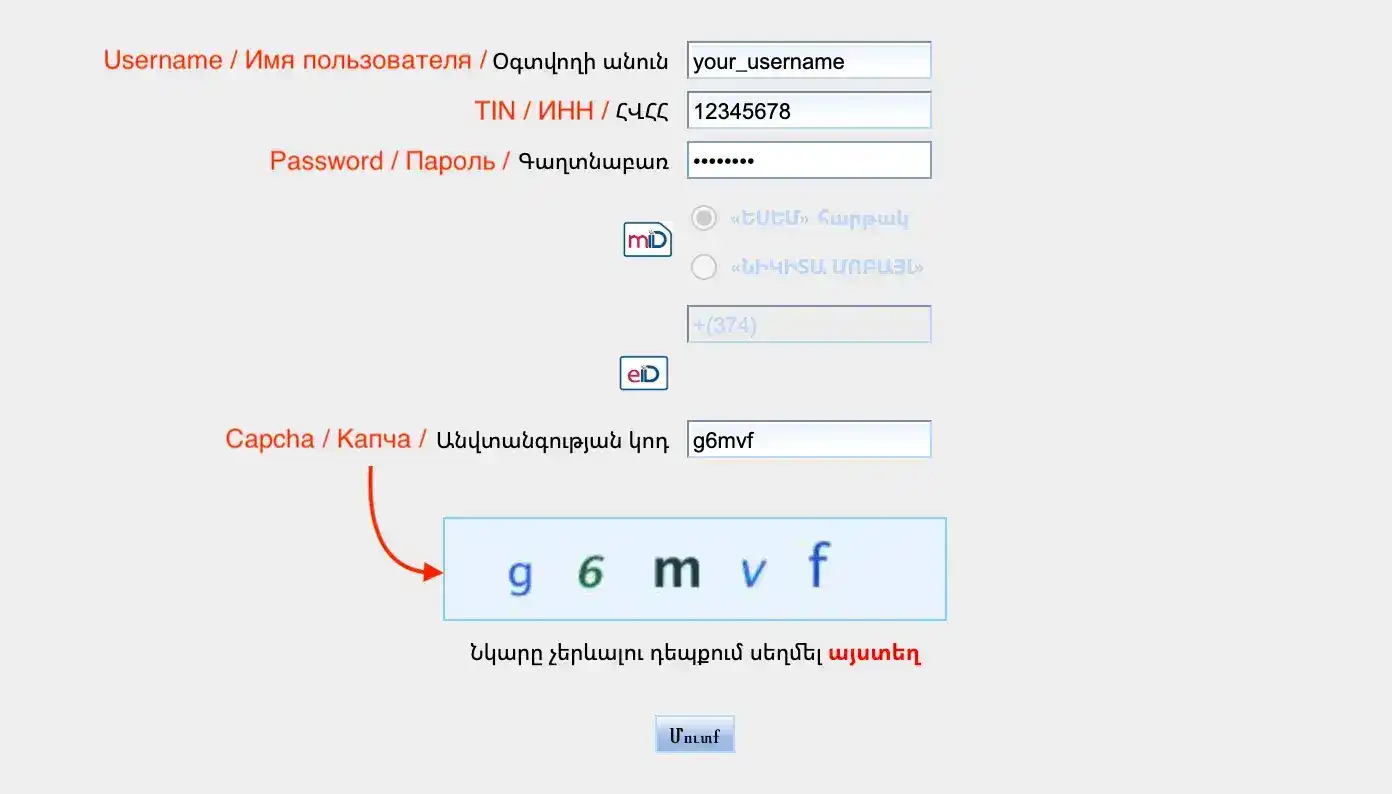
- Open file-online.taxservice.am
- Enter login (username) from the tax service email
- Enter your TIN (Tax Identification Number) - the number assigned to your company during registration. You can find it in the registration certificate.
- Enter password from the tax service email
- Enter captcha - the set of characters from the image
- Click the login button
Types of access to the taxpayer portal
There are two main types of access to the taxpayer portal: administrator (master access) and authorized person (accountant).
In short: the administrator can only manage access rights to the portal, while only the authorized person (accountant) account can submit reports.
1. Admin Access (Administrator/Owner)
Who receives: Business owner or their authorized person (chief accountant)
Capabilities:
- Create and manage authorized person accounts (accountants, representatives)
- Change settings and access rights
- Change password and restore access
What cannot be done:
- View, submit, sign reports to the tax service
- Get information about the company and employees
Important: The admin password can be changed at any time by sending a request to the tax service. This usually takes less than a day.
2. Authorized Person Access (Accountant/Representative)
Who receives: Accountant, company representative, or accounting service (for example, EasyTaxes)
Capabilities (depend on granted rights):
- View documents and reports
- Create and edit invoices
- Prepare tax declarations
- Sign documents with digital signature
- Submit reports to the tax service
- Work with employee and payroll data
Limitations:
- Cannot create new authorized person accounts
- Cannot change admin password
- Cannot remove the owner from the system
- Access rights are determined by the admin account owner
How to create an authorized person account?
Process for creating accountant access:
- Owner logs into the portal with admin login and password
- Adds an authorized person:
- In the user management section, creates a new account
- Specifies full name, passport data, and contact information of the authorized person
- Selects access rights (view, edit, sign)
- Access confirmation:
- A notification is sent to the authorized person's email
- Must confirm the intention to receive access by following the link in the email
- Access activation:
- After following the link in the email, the admin activates the new authorized person account
Main differences between access types
| Parameter | Admin Access | Authorized Person Access |
|---|---|---|
| Who receives | IE Owner/LLC Director | Accountant/Representative |
| User management | ✅ Yes | ❌ No |
| View documents | ❌ No | ✅ Yes (if allowed) |
| Create invoices | ❌ No | ✅ Yes (if allowed) |
| Submit declarations | ❌ No | ✅ Yes (if allowed) |
| Digital signature | ❌ No | ✅ Yes (if allowed) |
| Access recovery | ✅ Through tax service | ❌ Only through owner |
Changing accountant: what you need to know?
When switching from one accountant to another, the owner's participation with admin password is required:
- Deactivation of old authorized person:
- Owner logs into the portal with admin access
- Disables or deletes the previous accountant's account
- Creating a new account:
- Adds a new accountant (authorized person) following the procedure above
- Sets access rights
- Activation of new access:
- New accountant receives login and password by email and confirms access
- Owner activates the new accountant's account
Important: If there are multiple active authorized persons with signing rights in the system, signing reports may require participation of all authorized persons. This can disrupt automation and slow down processes. We recommend having only one active authorized person with signing rights - it's faster.
Frequently Asked Questions
- Q: If I have access to the portal, does it mean I can submit reports to the tax service independently?
A: Yes, you can submit reports to the tax service independently if you are an accountant or plan to become one. The portal is a tool for accountants, not for business owners. If you have no experience working with accounting in Armenia, you will face several obstacles:
- you must know Armenian language and understand legal terminology
- you must know the procedure for filling out reports - the portal does not always fill in all fields automatically
- you must know deadlines and tax legislation
- Q: Can I have multiple authorized persons simultaneously? A: Yes, but if multiple persons have signing rights, signing documents may require consent from all. It is recommended to have only one active authorized person with signing rights.
- Q: What to do if I forgot the admin password? A: You need to contact the tax service with an application to restore access. The process usually takes 1-2 business days.
- Q: Do I need to pay for access to the taxpayer portal? A: No, access to the taxpayer portal is provided free of charge by the Armenian Tax Service.
Useful links:
- Taxpayer portal: file-online.taxservice.am
- Tax service email: secretariat@petekamutner.am


